
Spades Offline - Card Game
Battery Stats SaverCard
4.91.23K Reviews
- Version
- 1.9.8
- Installs
- 500.00K
- Age Rating
- Teen
Screenshots
Our Review of Spades Offline - Card Game
 Analysis by Appyee
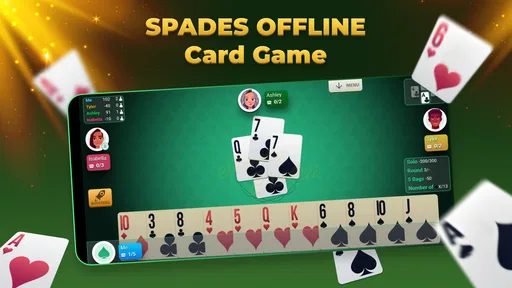
I keep a few card games on my phone for moments when I want something familiar without committing to a long online session. Spades Offline - Card Game fits that role well: it is a free card game built around Spades, with jokers included, and it is intended to work without requiring an active match against other players. After spending time with it, I see the appeal immediately. It gets to the cards quickly, asks very little of the player, and works best as a quiet companion for short breaks.
That simplicity is also the key to judging it fairly. This is not trying to replace a broad multiplayer card platform, a social gaming hub, or a collection packed with dozens of modes. Its value comes from giving Spades players a focused way to play. The developer is Battery Stats Saver, and the game has reached over 500 thousand installs with a 4.9 average from around 21 thousand ratings. Those figures suggest that the straightforward offline approach connects with a large audience, although popularity alone does not make it the right choice for every card-game fan.
How the game feels during ordinary play
I find the everyday rhythm works best when I treat each hand as a small decision rather than rushing to the next deal: bid, watch how the tricks unfold, then adjust what I expect from the cards still in play. That makes the joker variation easier to learn and gives a short session a satisfying shape. It also points to what keeps me coming back: the modest reward of seeing a plan work, even when the next hand resets the challenge.
Quick starts matter more than flashy presentation
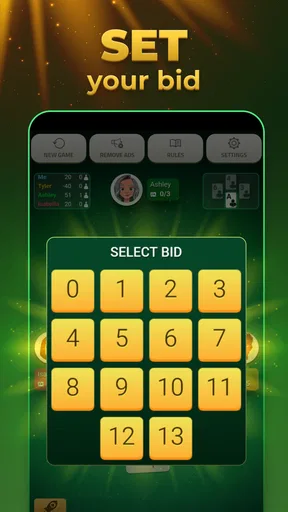
When I open a compact card game, I mainly want to begin a hand without navigating through layers of unrelated content. That is where this title makes sense. Its identity is clear from the start: choose a Spades-style game, review the cards, and concentrate on bidding and trick-taking. The lack of a need to find opponents online is especially useful when I am waiting somewhere, traveling, or simply trying to fill ten quiet minutes.
In perceived speed, the important advantage is the limited scope. A focused offline card game has fewer reasons to pause for network communication, matchmaking, or a lobby. I would not describe that as a promise of identical performance on every phone, but it does make the experience feel naturally suited to quick sessions. If you are looking for a game that can be opened for one hand and put away again, this format is more practical than a large card app that takes you through several menus before play begins.
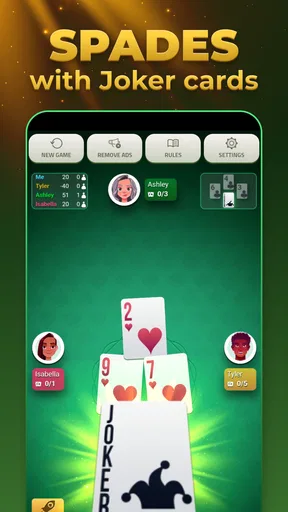
The included jokers give the game a slightly different character from the most familiar basic Spades tables. They are not just a visual detail; they change the way I think about a hand and make the decision-making less automatic. A player who already knows standard Spades should pay attention to the exact rules in the selected game rather than assuming every table behaves exactly like a home game. That small adjustment is one of the reasons the app feels more interesting than a bare digital deck.
Where it fits into a real day
A realistic use case is a commute with unreliable connectivity. I can imagine starting a hand before leaving home, continuing while waiting for an appointment, and stopping whenever the next part of the day arrives. An offline card game is also useful in places where I do not want to spend mobile data or depend on a stable signal. The emphasis here is not on dramatic action; it is on having a dependable little activity available when conditions are less convenient.
It also works for players who enjoy thinking in short bursts. Spades rewards checking the strength of a hand, estimating likely tricks, and deciding how aggressively to bid. I do not need a large uninterrupted block of time to enjoy that process. A few hands can provide enough concentration to feel satisfying without turning the game into a major commitment.
On the other hand, people who play cards mainly for conversation may find the offline design limiting. A physical table gives you expressions, jokes, and the feeling of playing with friends. A general online card platform may be better if live opponents, chat, rankings, or a persistent community are the main attraction. This game is strongest when the cards themselves are the reason I opened it.
What happens during longer sessions
The first few hands are easy to approach, but heavier use reveals a trade-off. A simple card game does not necessarily become more rewarding just because I play it for a long time. After several rounds, the value depends on whether I still enjoy the decisions and whether the available rule setup gives me enough variety. Players who like the rhythm of repeated bidding and trick-taking may stay engaged. Those who need a campaign, changing environments, or a large selection of unrelated games may feel the experience becomes narrow.
Long sessions are also when small interface frustrations matter most. Repeatedly reviewing cards, confirming choices, and following the table can make a compact design feel less comfortable if the controls are not exactly to my taste. I would approach this as a game for several short sessions rather than automatically expecting it to serve as an all-evening entertainment app. That is not a flaw in the concept, but it is an important expectation to set before downloading.
Jokers can make extended play more mentally demanding because familiar patterns are less reliable. I like that extra uncertainty, but it will not suit everyone. If you prefer a strictly traditional Spades experience, check the available table behavior carefully before settling into a long run. The variation can be a strength for experienced players and a source of confusion for someone learning the game for the first time.
Stability and recovering from interruptions
Offline play gives this title a practical reliability advantage: a hand does not depend on an opponent remaining connected or on a match server being available. That makes it a sensible option for a flight, a basement, or a weak-signal area. I still would not treat any mobile game as immune to interruptions. Incoming calls, switching between apps, low available storage, or the operating system reclaiming memory can affect what happens when I return.
My advice is simple: finish an important decision before leaving the game, especially if the phone is older or already busy with other apps. That is not a special defect of this title; it is a sensible habit for any turn-based game where losing the current state would be annoying. The offline format removes one major source of failure, but it cannot control the phone’s own background behavior.
Recovery is most comfortable when a game lets me resume without repeating a long setup. For this particular kind of app, the stakes are lower than in a competitive online match, but a player can still become frustrated if a nearly completed hand is interrupted. I would therefore use it confidently for casual breaks, while being a little more cautious about starting a lengthy session immediately before I need to leave.
Resource demands and older phones
The game supports Android devices running version 5.0 or later, which places it within reach of many older phones as well as newer models. That broad system range is useful for anyone who keeps an older device as a spare or does not upgrade frequently. A focused card game is also generally a more sensible choice for modest hardware than a visually heavy action title, although the exact experience can still vary with the phone’s condition.
I would not install it expecting it to transform a nearly full or sluggish device into a fast one. The age of the operating system is only one part of performance. Available storage, memory pressure, battery condition, and other running apps can all affect how responsive a phone feels. Closing demanding apps before a long session is a practical step if the device is older, particularly when I want the card controls to respond without distraction.
The resource trade-off is favorable for the intended use. There is no obvious reason to choose a card game like this for graphics, so the experience is judged more by readable cards, responsive decisions, and the ability to get into a hand without delay. If your phone struggles with basic menus or frequently reloads apps, I would test it during a short session before relying on it as your regular travel game.
Learning Spades with jokers in the mix
For a newcomer, the most important question is not whether the game is attractive but whether the rules are understandable. Spades already asks players to connect bidding with the number of tricks they expect to take. Jokers can add another layer, so I would recommend beginning conservatively instead of making ambitious bids immediately. Watch how the strongest cards behave, notice how the trump suit changes the hand, and use early rounds to learn the table’s interpretation of the rules.
That approach also helps experienced players who are moving from a physical variant to this app. Household rules often differ, and a joker-based table can make those differences more noticeable. Rather than treating the first hand as a serious test, I would use it as a calibration round. Once the behavior feels familiar, the game becomes easier to judge on strategy rather than on uncertainty about the rules.
A useful habit is to separate the bidding decision from the emotional temptation to chase every possible trick. In a digital game, it is easy to tap quickly because the next action is always visible. I get more value from slowing down, counting likely winners, and considering what the jokers mean for the rest of the hand. That turns a casual time-filler into a small exercise in planning.
Free access and the purchase question
The game is free to download, which makes trying it low-risk for someone who already enjoys Spades. It also carries a Teen content rating, so families should still review whether that age classification suits the intended player rather than assuming every card game is automatically appropriate for children.
There are in-app purchases ranging from less than a dollar to nearly a hundred dollars per item. That range is worth noticing before spending time with the game. I would treat the free experience as the basis for the decision and avoid buying anything simply because the app is useful during a particular bored moment. A purchase can be reasonable if it removes a genuine annoyance or adds something I will use repeatedly, but the presence of a high upper price makes it sensible to review each option carefully.
For a casual player, the free entry point is the main attraction. For someone who dislikes any purchase prompts in a simple offline game, those prompts may be more irritating than they would be in a larger entertainment app. This is one of the clearest situations where an alternative could be better: a paid card game with a single upfront cost may feel more comfortable if predictable ownership matters more to you than trying the game without paying first.
How it compares with the usual alternatives
Compared with playing physical cards, this app wins on convenience. I do not need a deck, a table, or three other people to begin. It also handles the repetitive parts of dealing and scoring, which leaves me free to focus on the decisions. Physical cards remain better for social interaction, flexible house rules, and the tactile pleasure of handling a real deck.
Compared with online Spades rooms, the offline approach wins when connectivity and privacy matter. I can play without waiting for a suitable opponent and without making a short break depend on a live match. Online alternatives are usually more appealing when I want human unpredictability, competition, or a sense of progression shared with other players. Neither option is universally superior; they serve different moods.
Compared with a broad card-game collection, this title is more focused. That can make it faster to reach Spades, but it also means I should not choose it if I want solitaire, hearts, rummy, or casino-style games in the same installation. Its identity is narrow enough to be useful: I download it for this particular style of play, not as an all-purpose card library.
Who should choose it and who should skip it
I would recommend it to someone who already likes Spades, wants an offline option, and prefers short sessions over a large social platform. It is also a sensible pick for travelers, people with inconsistent connectivity, and players who appreciate a joker-based variation that makes familiar decisions less predictable. The free starting point makes it easy to see whether the rules and pacing suit you.
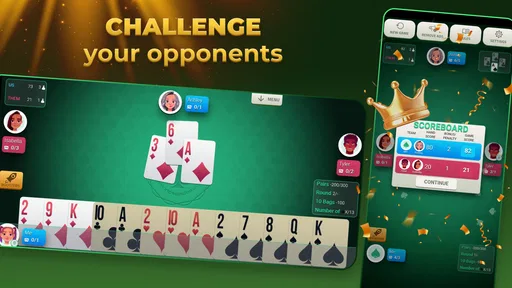
I would be more cautious about recommending it to a person who needs live multiplayer, detailed competitive tracking, or constant novelty. It is not the best match for someone who wants a polished board-game collection under one roof either. Players who dislike in-app purchase ranges that extend from small amounts to much larger individual items should compare it with a straightforward paid alternative before committing.
New players should also consider how much explanation they need. Spades is not difficult to enjoy, but bidding and joker behavior can take a few rounds to understand. If you want a guided tutorial that teaches every decision step by step, look closely at the opening experience before making it your main learning tool. If you are comfortable learning through play, the low-pressure offline format is more inviting.
My performance verdict
After weighing the speed expectations, heavier-session trade-offs, offline reliability, and broad Android compatibility, I see this as a practical rather than ambitious card game. Its strongest performance quality is not spectacle; it is the way the focused design suits quick access and play away from a network. The game should appeal most to people who want Spades available on demand and do not need a social layer around every hand.
The limitations are equally clear. Longer sessions may feel repetitive for players who need many modes, interruptions can still be affected by the phone itself, and the in-app purchase range deserves attention before spending. The Teen rating also means parents should make an age-appropriate decision instead of treating the game as automatically suitable for every household.
My recommendation is to try it as a dependable offline Spades companion, not as a complete replacement for every card-game experience. The 4.9 average from roughly 21 thousand ratings and around 1.2 thousand written reviews show strong user approval, while the current version, 1.9.8, keeps it clearly identifiable for anyone checking compatibility. For me, its best moment is a short, disconnected break when I want a thoughtful hand and no complicated setup. If that describes your use case, Battery Stats Saver’s game is an easy one to keep available; if you want people, variety, or a single-purchase experience, another card option will probably suit you better.
Verdict
Strengths of Spades Offline - Card Game
- Playable without Wi‑Fi or mobile data
- Simple rules make it accessible for beginners
- Quick rounds fit short gaming sessions
- Offers a relaxing alternative to competitive online play
- Works well for practicing bidding and trick-taking basics
Limitations of Spades Offline - Card Game
- Offline opponents may feel predictable over time
- Limited social interaction without multiplayer features
- Ads may interrupt gameplay in the free version
- Strategy options can feel shallow for expert players
- Device storage and battery use may vary by phone
Other Releases by Battery Stats Saver
View All
Photo Lock App - Hide Pictures
Personalization4.6

All Deleted Messages Recovery
Communication4.2

USB Screen Share - Phone to TV
Personalization3.8

Speak and Translate Languages
Communication4.7
Similar Picks in This Category
View All
Solitaire - Classic Card Games
MobilityWare4.6

UNO!™
Mattel163 Limited4.3

Spider Solitaire: Card Games
MobilityWare4.6

Solitaire.com - Classic Cards
Tripledot Studios Limited4.7

Plants vs. Zombies™ Heroes
ELECTRONIC ARTS4.1

Hearthstone
Blizzard Entertainment, Inc.4.1
Frequently Asked Questions
Can I play Spades Offline - Card Game without an internet connection?
Yes. Spades Offline - Card Game is designed for playing against computer opponents without requiring a constant internet connection. After installing the game, you can usually start a match in airplane mode or in places with limited coverage. An internet connection may still be needed for the initial download, updates, advertisements, or optional features, depending on the version installed on your Android or iOS device.
How does the gameplay work for someone new to Spades?
Spades is a trick-taking card game played with four players divided into two teams. Before each hand, players predict how many tricks they expect to win, and spades are always the trump suit. You must follow the suit led when possible, while the highest spade generally wins the trick. The app provides a convenient way to learn through practice against bots, although beginners may need a few rounds to understand bidding and scoring.
Are the computer opponents challenging and suitable for different skill levels?
The offline opponents offer a practical experience for casual players who want quick matches without competing online. Their behavior can feel predictable in some situations, especially for experienced Spades players, but they remain useful for learning, practicing bids, and improving decision-making. Depending on the available settings, you may be able to adjust difficulty or game rules, so it is worth checking the options before beginning a long session.
What game rules and settings are available in Spades Offline - Card Game?
The exact rules can vary by version, but offline Spades games commonly include options related to scoring, winning targets, nil bids, blind nil, and whether players can choose or customize certain match settings. Reviewing the rules menu is important because different Spades communities use slightly different house rules. If you prefer a specific style of play, confirm the available settings before downloading or starting your first match.
Is Spades Offline - Card Game free, and does it contain advertisements or in-app purchases?
The game may be available as a free download, but free versions commonly support development through advertisements and may include optional purchases, such as removing ads or unlocking additional features. The exact pricing, advertising frequency, and purchase options can change between updates and platforms. Before installing, check the Google Play Store or Apple App Store listing for current details, permissions, subscription information, and any device compatibility requirements.
Play our best games!


